


Download OnePriceTaxes – Secure Online Tax Filing Tool for U.S. Wage Earners
Overview
OnePriceTaxes is a cloud‑based tax preparation web app designed specifically for U.S. wage earners who want a fast, reliable, and secure way to file both federal and state returns. Unlike desktop tax software that requires installation and frequent updates, OnePriceTaxes runs entirely in your browser, meaning you can start a return on a Windows PC, switch to a Mac, and finish on a tablet without losing any data. The platform supports the most common IRS forms—including 1040, 1040‑A, and 1040‑EZ—while also handling more complex scenarios such as itemized deductions, dependents, investment income, retirement distributions, and 1099‑MISC contractor earnings.
A built‑in knowledge base offers articles on popular topics like the Adoption Credit, Child Tax Credit, and the latest tax brackets, helping users avoid common pitfalls. Although OnePriceTaxes does not offer a permanently free tier, it provides a risk‑free trial that lets you explore the interface before committing to the filing fee. Once your return is complete, you can choose to e‑file directly through the platform or print the forms for manual submission.
The service also bundles state filing (where supported) into the same fee, delivering a cost‑effective solution for taxpayers who need both federal and state returns processed in a single session. A refund‑guarantee promises that any miscalculation caused by the software will result in a full service‑fee refund, giving users added confidence in the accuracy of their filings.
Key Features That Make OnePriceTaxes Stand Out
- Full‑Form Support: Prepare and file IRS Forms 1040, 1040‑A, 1040‑EZ, and related schedules directly in the browser.
- State Filing Integration: File supported state returns alongside your federal return for a single, streamlined fee.
- Itemized Deduction Wizard: Step‑by‑step guidance for mortgage interest, charitable contributions, medical expenses, and more.
- Dependent & Credit Calculator: Automatically applies Child Tax Credit, Earned Income Credit, Adoption Credit, and other family‑related benefits.
- Investment & Retirement Income Handling: Accurately reports capital gains, dividends, and distributions from IRAs, 401(k)s, and other retirement accounts.
- 1099‑MISC Contractor Module: Simplifies quarterly estimated tax calculations and self‑employment tax obligations.
- Secure Cloud Storage: All data is encrypted in transit (TLS 1.2) and at rest, meeting industry‑standard security protocols.
- Live Help & Knowledge Base: Access articles, video tutorials, and a responsive chat widget for real‑time assistance.
- Refund Guarantee: Service‑fee reimbursement if the software miscalculates your return, reinforcing trust.
- Multi‑Device Access: Compatible with Windows, macOS, Linux, and any modern browser, ensuring you can file from virtually any computer.
These features combine to create a comprehensive, user‑friendly experience that rivals traditional desktop tax programs. By centralizing the entire filing process in a secure, browser‑based environment, OnePriceTaxes eliminates the need for costly software updates and reduces the learning curve for first‑time filers. The integrated help center also means you don’t have to search the internet for answers; everything you need is a click away, which can dramatically shorten the time it takes to complete a return—often under an hour for straightforward cases.
Installation, Usage Instructions, and Compatibility
Because OnePriceTaxes is a web application, there is no traditional installation process. Getting started is as simple as navigating to the official website, creating a secure account, and launching the tax wizard. Follow these steps to begin:
- Visit the Official Site: Open any modern browser (Chrome, Firefox, Edge, Safari) and go to onepricetaxes.com.
- Create an Account: Click “Sign Up,” provide your name, email address, and a strong password. An email verification link will be sent to confirm your identity.
- Start a New Return: After logging in, select “Start New Federal Return.” The system will automatically import the latest tax year forms and rates.
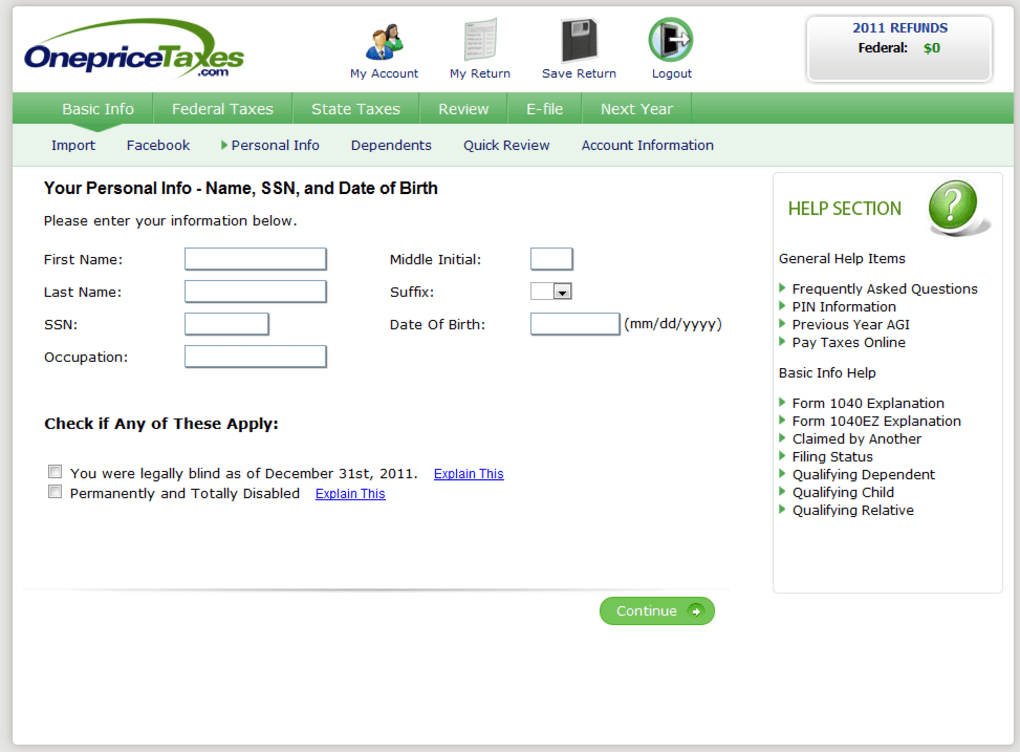
- Enter Personal Information: Input your filing status, dependents, and basic contact details. The platform validates entries in real time to reduce errors.
- Complete Income Sections: Use the guided modules to add W‑2 wages, 1099‑MISC income, investment statements, and retirement distributions. Upload PDFs of your documents if you prefer auto‑extraction.
- Deduction & Credit Review: The wizard suggests applicable deductions and credits based on your data, allowing you to accept or adjust each recommendation.
- State Return Option: If your state is supported, select the “Add State Return” checkbox. OnePriceTaxes will populate the state form with information already entered for the federal return.
- Review & Submit: Perform a final review using the “Error Check” feature, which highlights any missing fields. Choose to e‑file or download printable PDFs.
- Payment: After confirming the total filing fee (including state fees where applicable), enter payment details. OnePriceTaxes accepts major credit cards and ACH transfers.
Supported Operating Systems: Since OnePriceTaxes runs in a browser, it works on Windows 10/11, macOS Ventura and later, Linux distributions with a modern web browser, and even Chrome OS. Mobile browsers on Android and iOS are supported for viewing and basic data entry, though full filing is recommended on a desktop or laptop for optimal usability.
Security is a top priority; the platform employs two‑factor authentication (2FA) for account protection and stores all tax data in encrypted databases hosted on compliant cloud servers. Regular backups and automatic session timeouts further safeguard your personal information. The absence of a downloadable client eliminates the risk of outdated software, as every user automatically accesses the latest version of OnePriceTaxes each time they log in.
Pros, Cons, and Frequently Asked Questions
Pros
- All‑in‑one federal and supported state filing in a single fee.
- Browser‑based platform eliminates installation hassles and ensures up‑to‑date tax rules.
- Comprehensive deduction and credit engine maximizes refunds.
- Secure encryption and 2FA protect sensitive financial data.
- Refund guarantee reduces risk of software‑related miscalculations.
- Extensive knowledge base and live chat for real‑time assistance.
Cons
- No permanently free tier; users must pay to file, though a trial is available.
- State filing not supported in several states (e.g., Colorado, Hawaii, Maine, etc.).
- Limited offline capability; an internet connection is required throughout the process.
- Pricing may be higher upfront compared to budget‑friendly competitors like TaxACT.
- Complex multi‑state filings may require additional manual steps.
Can I e‑file my federal return directly through OnePriceTaxes?
Yes. Once you complete the return and pass the error check, OnePriceTaxes submits your federal return electronically to the IRS. You’ll receive an acknowledgment receipt within minutes.
What states are currently unsupported for state filing?
As of the 2024 filing season, OnePriceTaxes does not support Colorado, District of Columbia, Hawaii, Louisiana, Maine, Massachusetts, Michigan, Minnesota, Montana, Vermont, and Wisconsin. Users in these states must file state returns separately.
Is my personal and financial information safe on OnePriceTaxes?
Security is built into the platform with TLS 1.2 encryption, AES‑256 data‑at‑rest encryption, two‑factor authentication, and regular third‑party security audits. The company complies with IRS e‑file security standards.
How does the refund‑guarantee work?
If OnePriceTaxes miscalculates your return and the IRS issues a correction that changes your refund amount, the service fee you paid will be fully refunded. You must submit a claim within 30 days of the correction notice.
Can I import previous year’s tax data to speed up the filing process?
Yes. OnePriceTaxes allows you to upload a PDF of your prior year’s return, and the system will extract key data points such as personal information, dependents, and carry‑forward amounts, reducing manual entry.
What payment methods are accepted for filing fees?
The platform accepts major credit cards (Visa, MasterCard, American Express, Discover) and ACH bank transfers. Payments are processed securely through a PCI‑DSS compliant gateway.
Weighing the pros and cons alongside these common questions can help you decide whether OnePriceTaxes aligns with your filing needs. For many wage earners who value a streamlined, secure, and fully supported web‑based solution, the platform offers a compelling blend of features and peace of mind.
Conclusion & Call to Action
OnePriceTaxes positions itself as a robust, browser‑native alternative to traditional desktop tax software. Its comprehensive form support, integrated state filing (where available), and a powerful deduction engine make it suitable for both simple 1040‑EZ returns and more intricate filings involving investments, retirement income, or self‑employment earnings. While the lack of a permanent free tier and the exclusion of several states from state filing may deter price‑sensitive users, the platform’s security features, refund guarantee, and real‑time assistance provide tangible value that can justify the higher upfront cost for many filers.
If you’re ready to experience a fast, secure, and all‑in‑one tax filing process, simply create your free trial account today. Complete your return with confidence, e‑file instantly, and enjoy the peace of mind that comes from using a tool built specifically for U.S. wage earners. Remember, the sooner you file, the sooner you can claim any refunds you’re owed—so don’t delay!



.png)



